Digital Notebook Study Planner: organized notes, checklists, and secure vault
Draft lecture notes, build checklists, and schedule deadlines using the app’s daily planner and calendar integration, all within a single workflow. Golden Associate Pvt. Ltd. publishes this Android productivity tool aimed at students and small teams, blending a visual note editor with task management. The app offers rich text editing, color-coded categorization, password/PIN locking, and global search, so students tracking coursework and professionals juggling projects can keep notes, reminders, and private entries in one place.
What the app does for study and task workflows
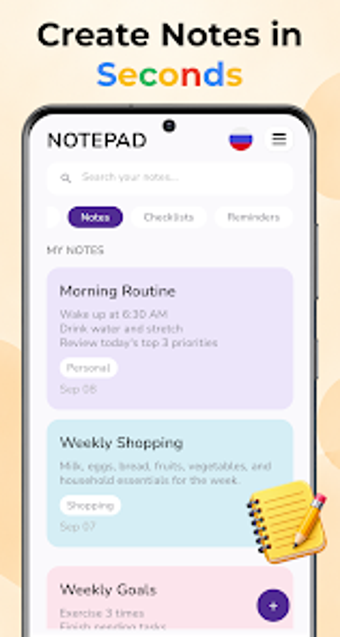
Digital Notebook Study Planner combines text notes, a To-Do list, and a daily planner so users can move from capture to action inside one interface. The app supports rich text note-taking, checklist creation, and calendar-linked reminders, which lets a student record a lecture, convert action items into checklist tasks, and add deadline alerts without switching tools. Categorization by custom colors separates school, work, and personal projects within the same account.
How core outputs are structured for professional use
The app arranges work around saved pages and scheduled tasks, so deliverables appear as notes with attached reminders rather than isolated items. Color-coded backgrounds and categories let project folders show at a glance, while global search finds saved pages and keywords across notes. This setup supports semester planning or multi-phase projects by keeping timelines, checklists, and written material linked in one visible place.
Onboarding, protection, and daily use friction
The interface offers customizable note backgrounds and simple editing tools that reduce setup time for routine capture, and the built-in Password Lock secures sensitive entries with a PIN or password. Because the app focuses on single-device Android use, initial setup is limited to device compatibility and the developer’s provided templates; users familiar with mobile note apps encounter a short learning curve when adopting the planner and locking features.
Who benefits most and when to choose it
Students and solo professionals who need a visual, locked notebook and an integrated task list will find the app useful, particularly for semester planning and day-to-day task tracking. The developer bundles note editing, reminders, and a private vault into one Android package, so choose this app when you want single-app control of notes and deadlines rather than juggling separate editors and planners.